Monday, July 12, 2021

How to Finally Delete Duplicate iCloud Contacts

How to Finally Delete Duplicate iCloud Contacts

How to Finally Delete Duplicate iCloud Contacts

Image for article titled How to Finally Delete Duplicate iCloud Contacts
Photo: ibreakstock (Shutterstock)

iCloud offers an easy and reliable way to sync your contacts across Apple devices, which is why it remains a popular choice. However, an iCloud bug sometimes leaves you with many—many—duplicate contacts. Something as simple as signing in and out of iCloud can cause a syncing issue that leaves you with thousands of duplicate entries in the address book, which nobody wants.

However, there are a few quick ways to fix this, and I'll walk you through each of them.

Delete duplicates using the Contacts app on a Mac

If you have a Mac, you can delete duplicate iCloud address book entries using the built-in Contacts app. For this to work, you first need to check that iCloud contacts are syncing with your Mac—if they're not, you won't be able to see any contacts on the app. To do that, click the Apple logo in the top-left of your Mac's home screen and go to System Preferences > Apple ID. Under "Apps on This Mac Using iCloud," make sure that Contacts is checked.

Once you've done that, open the Contacts app on Mac. If you're having trouble finding it, use the Command+Space Bar shortcut to fire up Spotlight search (or try these better alternatives). In the search bar, type Contacts and open the app. Here you'll be able to see all of the duplicate entries in your contact list. To find all duplicates in one fell swoop, go to the menu bar at the top and navigate to Card > Look for Duplicates.

The "Look for Duplicates" option in the Contacts app for Mac.
Screenshot: Pranay Parab

A few seconds later, the Contacts app will show you how many duplicates you have. There's a checkbox in this pop-up, which asks if you want to merge other contacts that have the same name, but contain different information—such as two entries for John Doe, with one having his phone number and the other his email address. You can check this box if you want to merge those contacts, too.

When you're ready, click Merge, and the Contacts app will do the rest.

Merge duplicate entries in the address book using the Contacts app on Mac.
Screenshot: Pranay Parab

Manually select and delete duplicates on iCloud.com

Alternatively, you can use iCloud.com to manually select and remove duplicate contacts. Remember that this method does not work on mobile devices, such as your iPhone. You'll have to open iCloud.com on a laptop or a desktop to access iCloud contacts.

To get started, go to iCloud.com in any browser and sign in. Once you've logged in, click Contacts to view your address book on the web. This will show you all the duplicate contacts. You can hold Command on Mac or Control on Windows and click each duplicate contact until you've selected them all.

Manually selecting duplicate contacts on iCloud.com.
Screenshot: Pranay Parab

Now just press Delete on the keyboard to see a confirmation pop-up that checks if you really want to delete those contacts. You do, so select Delete to get rid of the duplicate entries.

Use Gmail to delete duplicate iCloud contacts

If you'd rather not spend hours selecting 10,000 duplicate contacts, you can quickly export iCloud contacts to Gmail and clear duplicates on Google's service. Before you proceed, it's important to understand exactly what we're going to do—because this method involves a risk of losing all of your contacts.

We're going to export all contacts from iCloud, import them into Google Contacts, and remove duplicates there. Then we'll delete all contacts from iCloud and import the de-duplicated contact list from Google Contacts. If anything gets messed up along the way, there is a risk of losing your contacts, so be sure to have a backup of all contacts—and proceed with caution.

Let's start by signing in to iCloud contacts in any browser. Once you have iCloud contacts open, click the gear icon in the bottom-left corner and then click Select All. With all contacts selected on iCloud.com, click the gear icon once more and select Export vCard. This will export a .vcf file containing all of your contacts, and you can save it anywhere on your computer.

Exporting iCloud contacts.
Screenshot: Pranay Parab

Now log in to Google Contacts in your browser. It's best to use a fresh Google account that has no previously saved contacts to avoid a mix-up. When you're signed in, click the Import button in the left pane and hit Select file in the pop-up. Find the .vcf file you exported from iCloud, select it, and click Import.

Google Contacts will take a few seconds to import all of your contacts. Once it's done, all imported contacts will be neatly sorted in a label in the left pane. It usually reads: "Imported on DATE." With all contacts imported, select Merge & fix in the left pane, which is below the Frequently contacted button.

The "Merge & Fix" tab in Google Contacts.
Screenshot: Pranay Parab

This will show all the duplicates and let you merge them, too. If it shows no suggestions, refresh the page once to make it work. Review to see if it shows all duplicate contacts, and then click Merge all. Finally, click the Contacts button in the left pane and check if all contacts have been merged.

Now it's time to export these merged contacts. Press Control+A on Windows or Command+A on Mac to select all contacts and click the three dots icon below the search bar at the top. Select Export. In the pop-up, choose vCard under Export as and click Export. Now save this file somewhere safe on your computer.

Export from Google Contacts.
Screenshot: Pranay Parab

Let's bring these fixed contacts back to iCloud, shall we? Return to iCloud contacts in any browser, hit the gear icon in the bottom-left, and click Select All. You can click the gear icon again and click Delete to remove all of your contacts from iCloud.

Once that is done, hit the gear icon in iCloud contacts again, and select Import vCard. Now import the contacts file you just exported from Google Contacts. This will fix all your duplicate contacts on iCloud.

Delete duplicate contacts using an iPhone app

For those who don't have access to a computer, there is an iPhone app that will delete all duplicate contacts quickly. It would've been a lot better if the Contacts app on iPhone could do the job, but sadly that's not yet possible in the timeline we live in.

That's why we're going to use a third-party app to complete the task quickly. I checked out a lot of apps that let you delete duplicate contacts, but most of them appeared to be too expensive or had unclear (or alarming) privacy policies. Fortunately, Duplicate Contacts Fixer is inexpensive, and its App Store page suggests it doesn't collect any data, so that's the app we're going to use.

Follow these steps:

  1. Download Duplicate Contacts Fixer and open the app.
  2. Give it access to your contacts, when the app asks for it.
  3. You can delete three duplicate contacts for free. The "pro" upgrade costs $3 per year. (I'll show you how to make sure it doesn't auto-renew the subscription.)
  4. With the Pro upgrade purchased, the app will prompt you to back up your contacts in a .vcf file. Tap Yes and save the file anywhere on your iPhone (such as a folder in iCloud Drive).
  5. Now tap Find Duplicates on the app's home screen.
  6. A few seconds later, the app will show you how many duplicate contacts are on your phone. You can then tap Delete Duplicates.
  7. The app will delete all the duplicate iCloud contacts from your phone.
  8. Finally, it's time to stop the subscription from auto-renewing. Open the App Store and tap the profile icon on the top-right.
  9. Select Subscriptions > Duplicate Contacts Fixer.
  10. Tap Cancel Subscription and confirm it when a pop-up asks you to do so. You'll still be able to use the app's features for a year after cancelling the auto-renewal.

With that done, you should also check out how to move all your photos from iCloud to Google Photos.

Pranay Parab is an independent tech journalist based in Mumbai, India. He covers tech for Lifehacker, and specializes in tutorials and in-depth features.


Jason @BeardedOverland www.beardedadv.blogspot.com

Slammed Jeep Gladiator With Dually Rear Axle Is Heading To SEMA | Carscoops

Slammed Jeep Gladiator With Dually Rear Axle Is Heading To SEMA | Carscoops

Slammed Jeep Gladiator With Dually Rear Axle Is Heading To SEMA

An insane Jeep Gladiator that has been slammed and extensively modified is heading to November's SEMA show and you may be shocked to see how much work was needed to make it a reality.

This Gladiator has come to life thanks to Co-Up Auto Body in Ontario, Canada and started out life as a black, totally stock pickup truck. The first major modification involved removing the Jeep's standard solid front axle and fitting an independent suspension system with air ride, meaning the ride height can be adjusted on the fly.

Read Also: Jeep May Grant Enthusiasts' Wishes And Launch A V8-Powered Gladiator

Things didn't stop there as the standard rear end was also removed and replaced with the dually setup of a 2008 Ram 3500. Obviously, the truck isn't quite as practical as it once was but the revised bed does catch the eye as it features a hinged floor that allows you to see the tanks for the air suspension, quad compressors, hardlines, and the painted rear suspension and axle.

Speaking of paint, the Jeep has been adorned in the same shade of Iconic Red as the Acura NSX.

Like any good build, work has also been done on the engine but rather than replacing the standard Pentastar 3.6-liter V6 with a big V8, Co-Up Auto Body instead decided to fit the standard V6 with a Magnuson supercharger that should increase grunt to around 425 hp.

The entire build of the Jeep Gladiator has been covered in a YouTube series with no less than 33 episodes.


Jason @BeardedOverland www.beardedadv.blogspot.com

Saturday, July 10, 2021

As Marvel’s epics get bigger, Black Widow’s stakes feel too small - The Verge

As Marvel's epics get bigger, Black Widow's stakes feel too small - The Verge
I couldn't disagree more with this article. I think the timing for the new film is perfect. While androids, aliens and sorcerers are fun Marvel fair, it can get old. This film is a deeper look into the Black Widow character, connecting 2011 eye Candy, to heartfelt sacrificing heroine in 2019. I applaud Marvel for taking a step back from the big bad over the top villains, to focus on a story that would align with the skill sets of the main character. 
Yes a god like Thor could have taken out the red room in a heartbeat, but that would not be a story. It's as ridiculous as Hawkeye taking out Thanos singlehanded. The whole MCU needs to have these epic films, but at the same time, it also needs to pull back and have smaller ones so we can enjoy those less awe inspiring characters. 
On another note, here is an updated MCU timeline, and yes I'm still leaving Agents of Shield in the list. 😂 even after the TVA reveal. 


  • Captain America: The First Avenger (2011)
  • Marvel's Agent Carter Season 1 (2015 8 episodes ) 
  • Marvel's Agent Carter Season 2 (2016 10 episodes ) 
  • Captain Marvel (2019)
  • Iron Man (2008)
  • Iron Man 2 (2010)
  • The Incredible Hulk (2008) 
  • Thor (2011) 
  • The Avengers (2012)
  • Iron Man 3 (2013)
  • Thor: The Dark World (2013)
  • Captain America: The Winter Soldier (2014)
  • Marvel's Agents of S.H.I.E.L.D Season 1 total of 22 episodes (2013)
  • Guardians of the Galaxy (2014)
  • Guardians of the Galaxy Vol. 2 (2017)
  • Daredevil Season 1 (2015 13 episodes )
  • Avengers: Age of Ultron (2014)
  • Marvel's Agents of S.H.I.E.L.D Season 2 (2014 22 episodes )
  • Ant-Man (2015)
  • Jessica Jones Season 1 (2015)
  • Daredevil Season 2 (2016 13 episodes )
  • Captain America: Civil War (2016)
  • Black Widow (2021)
  • Marvel's Agents of S.H.I.E.L.D Season 3 (2015)
  • Luke Cage Season 1 (2016)
  • Spider-Man: Homecoming (2017)
  • Doctor Strange (2016)
  • Black Panther (2018)
  • Iron Fist Season 1 (2017)
  • Marvel's Agents of S.H.I.E.L.D Season 4 (2016)
  • The Defenders Season 1 (2017)
  • The Inhumans Season 1 (2017)
  • Thor: Ragnarok (2017)
  • The Punisher Season 1 (2017)
  • Jessica Jones Season 2 (2018)
  • Luke Cage Season 2 (2018)
  • Cloak and Dagger Season 1 (2018)
  • The Runaways Season 1 (2017)
  • Daredevil Season 3 (2018)
  • The Punisher Season 2 (2019)
  • Marvel's Agents of S.H.I.E.L.D Season 5 (2017)
  • Iron Fist Season 2 (2018)
  • Ant-Man and The Wasp (2018)
  • Avengers Infinity War (2018)
  • Avengers: Endgame (2019)
  • Spider-man Far From Home (2019)
  • Wandavision (2021) (Disney+)
  • The Falcon and Winter Soldier (2021) (Disney+)
  • Loki (2021) (Disney+)
https://www.theverge.com/platform/amp/2021/7/9/22569137/black-widow-marvel-endgame-space-magic-loki-wandavision

As Marvel's epics get bigger, Black Widow's stakes feel too small

A movie out of time, in more ways than one

Black Widow was released at the wrong time, in multiple ways. The new Marvel prequel was one of the most high-profile films to be displaced by the constantly shifting theatrical release schedule caused by the shuttering of theaters due to the COVID-19 pandemic. But Black Widow — a film set between Captain America: Civil War's superhero dust-up and Avengers: Infinity War's cosmos-spanning epic — feels like a movie that should have been released when it's actually set, instead of as a belated prequel.

Warning: spoilers ahead for Black Widow, Avengers: Endgame, Loki, and the general Marvel Cinematic Universe

Photo: Marvel Studios

It's not that Black Widow is a bad movie or an unworthy member of the Marvel saga. Its brand of James Bond-esque spy-fi harks back to some of the more grounded MCU films like Captain America: The Winter Soldier, less focused on superpowered smack-downs in favor of more traditional action movie fare.

And if it had been released in 2016 after Civil War, that would have been fine. But Marvel's films have undergone vast shifts in tone since then. Doctor Strange opened up the connected universe to straight-up magic, Guardians of the Galaxy Vol. 2 and Thor: Ragnarok both offered galaxy-spanning adventures with whole planets at stake, and of course, Infinity War and Endgame see the Avengers — and Natasha Romanov — fight to save quite literally all of existence.

After all that, Black Widow's stakes feel low, especially for a character that fans have gotten to see in action in far bigger adventures for over a decade. For all the joking about how Thor could handle the Red Room without breaking a sweat, the over-the-top reality that is the regular day-to-day of the modern Marvel shows and movies hangs over Black Widow's throwback style.

Nothing in Black Widow's story really necessitates it to be a prequel, either. Sure, it's fun to see where Natasha gets her Infinity War get-up from. But outside of its post-credit setup (which is set in the MCU's post-Endgame "present"), there's no story element or revelation about Natasha's character that would be different had the film been released a half-decade earlier.

In fact, knowing Natasha has this found family to protect (one that the rest of the Avengers didn't know about) could have arguably deepened her short-shrifted sacrifice in Endgame. Imagine if Natasha's adopted sister or parents were lost in Thanos' snap, and the sequence where she fights with Hawkeye over who gets to fling themselves off a cliff has the added weight of trying to bring them back, too. (Instead, we had Clint as the only one to potentially have to sacrifice being with his family.)

Photo: Marvel Studios

Contrast that with Loki. The show is airing on Disney Plus right as Black Widow comes out, and it also examines an older version of a Marvel character in a new light. But where Loki is using that perspective to re-examine what makes its titular character tick, and what separates the version of Loki then from the more heroic one fans were familiar with, Black Widow doesn't give Natasha the chance to change or grow. She's already at the end of her journey, fully formed — she's just the only one who doesn't know it.

Black Widow also suffers from COVID-related delays; Disney is only releasing it now because it's running out of time, thematically. Its interconnected web of shows and movies means that Marvel can't advance with series like Hawkeye (which will directly follow up Black Widow's post-credits scene). But it also means that Black Widow's comparatively grounded and realistic adventure is coming after WandaVision's sorcerous saga or Loki's era-spanning epic.

It's not that Black Widow doesn't try to raise the stakes, establishing Dreykov's army of Widows as some kind of massive, political force that secretly controls the world. But once you get cosmic magical space mysteries as the norm, it's hard to go back to "spies, but better" as your table stakes.

Photo: Marvel Studios

There's a world where Marvel was willing to commit to a film led by one of its female characters in 2016 instead of 2019 (when Captain Marvel finally broke the MCU's decade-long streak of male protagonists), where Black Widow serves as a spotlight on Natasha's origins ahead of her ultimate sacrifice, and where the stakes are still aligned with the studio's other properties.

Based on the trailer for Marvel's next theatrical bow, Shang-Chi is about to punch a dragon in the face with magic space rings. And next to that, it's hard not to feel like Black Widow's brand of more grounded spy action is too little, too late.


Jason @BeardedOverland www.beardedadv.blogspot.com

Tuesday, July 6, 2021

Valley of the Gods Utah: Map, Scenic Road and Overlook

Valley of the Gods Utah: Map, Scenic Road and Overlook
Definitely on my todo list. 

Valley of the Gods Utah: Map, Scenic Road and Overlook

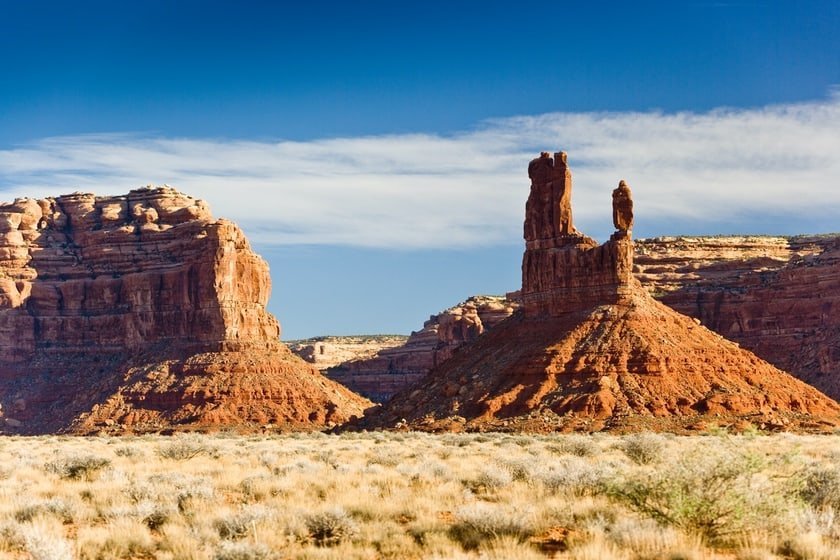
Did you know that Monument Valley has a little sister called Valley of the Gods? You must be thinking "All right, even if it does exist, who knows in what remote corner of America this mysterious Valley of the Gods must be"! What if I told you it is 30 minutes or less from Monument Valley? Then, what if I also told you that visiting it is completely free and that the restrictions the Navajo impose in Monument Valley are not enforced here? I know, I know, the description is intriguing indeed, especially if you consider that these are just some of the advantages of visiting Valley of the Gods.

In this article, we want to tell you all about Valley of the Gods, an authentic hidden gem of Utah. We will show you how to get there, what to do, the limitations you may experience when visiting the valley and with what other points of interest you can add to your road trip.

Contents [Hide]

  • Monument Valley to Valley of the Gods: Directions
  • Valley of the Gods Road: What to See?
    • Valley of the Gods Utah Map
  • Attractions Near Valley of the Gods
    • Moki Dugway and Muley Point Overlook: Only for the Brave…
  • Where to Stay near Valley of the Gods
  • Video Tour

Monument Valley to Valley of the Gods: Directions

monument valley to valley of the gods

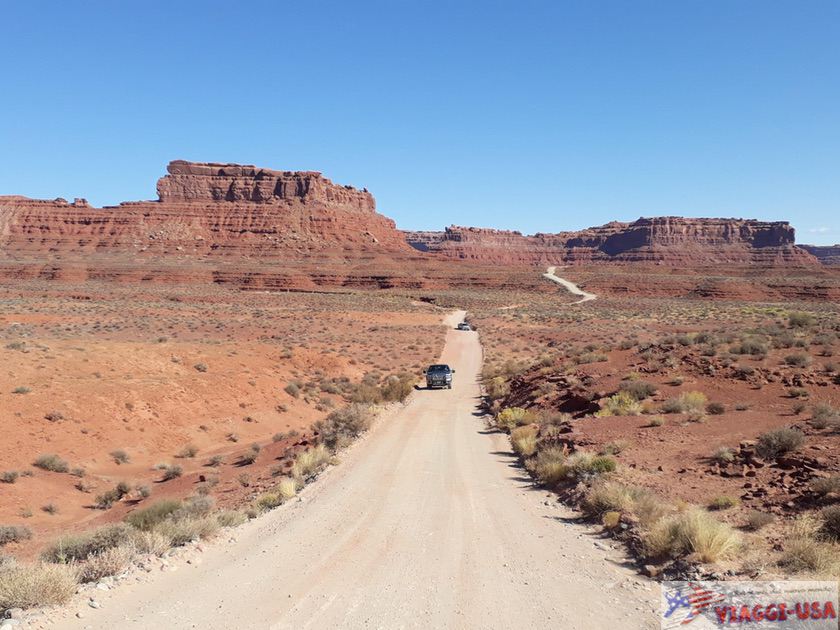
To visit the Valley of the Gods you must reach the spectacular Valley of the Gods Road, a dirt road that is well-maintained, preferably in a 4×4, but you can also drive on it with other vehicles if the terrain is in good condition. Here are the directions to get there:

  • Most likely, you will decide to go to the Valley of the Gods while on a West Coast road trip, after visiting Monument Valley. Those coming from Page or the Grand Canyon should use Kayenta as a reference point, a small town southwest of the Valley of the Gods. From here, take US-163 and follow it for 50 miles, passing Monument Valley. The junction to the Valley of the Gods is here, 7.5 miles after the tiny town of Mexican Hat, famous for the sombrero shaped rock formation nearby.
  • If you are coming from the northeast, maybe after having gone on a tour of the parks in Utah around Moab, you must travel 17 miles past Bluff. Drive a short distance on US-191 and at the first fork, continue straight on US-163 (you will know you are on the right road if you see the signs for Mexican Hat). 12 miles from the fork, turn onto Valley of the Gods Road on your right. Here you will begin your adventure in the heart of the Valley of the Gods.

Valley of the Gods Road: What to See?

valley of the gods road

Valley of the Gods Road is a 17-mile long dirt road that weaves through the heart of a desert territory where rock formations similar to those found in the Monument Valley – which are much better known –  are clearly visible, such as mesas, pinnacles, monoliths and rocks shaped by erosion and by the elements over millennia that started 250 million years ago.

Along this road, it is possible to stop at various overlooks, which offer splendid views. In addition, unlike the Monument Valley, you can walk into the valley and get a closer look at the various rock formations – which are at some distance from the road – although the area is not guarded and the trails are not marked. One of the most fascinating advantages of visiting Valley of the Gods is that there are few tourists, nothing in comparison to the number of tourists that visit Monument Valley. Here you can get out of the car, sit on the rocks and observe the view in absolute silence, interrupted only by the sound of wind. It is very unlikely that you will hear any cars pass by.

For those who plan on camping, you can pitch a tent in the Valley of the Gods and sleep under the stars. The Navajo gods and goddesses will watch over you. However, you must be completely self-sufficient, whether you sleep in the valley or not! Bring water and food, because there are no visitor centers or other facilities along this route.

Valley of the Gods Utah Map

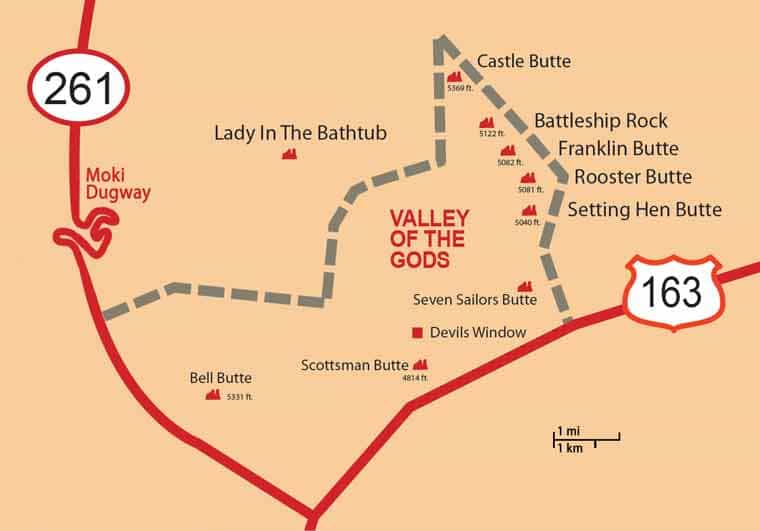
valley of the gods map
Map of Overlooks in Valley of the Gods

Visiting the park is very simple, just drive along the main road (Valley of the Gods Road) to visit the following viewpoints one by one, where you can stop to take some pictures:

  • Seven Sailors Butte: the seven sailors of the Valley of the Gods will be the first to greet you;
  • Setting Hen Butte and Rooster Butte: you'll see these gnarled rock formations towering in the valley 3 miles from the start of the road;
  • Franklin Butte: after another 2 miles, you'll see it on the left. It looks like sentinel that is on guard, defending the entire valley;
  • Battleship Rock: still on a military theme, the Battleship Rock really looks like a majestic red rock warship… You'll notice it on the left, a mile from Franklin Butte;
  • Castle Butte: after 1.86 miles, you will find Castle Butte, and the name speaks for itself…it resembles a castle in the middle of the desert!
  • Lady in the Bathtub Butte: last but not least, on the right side of the road you will see in the distance the rocky outline of a woman taking a bath in the tub.

After this butte, for the last 5 miles, the panorama will be more boring and the road continues until it connects with SR-261.

Attractions Near Valley of the Gods

The Valley of the Gods Road is not a loop, so when it finishes, unless you want to drive all the way back, you'll have to go back another way. You'll do it by turning left into UT-261 southbound. After a few miles, you will get back onto US-163 S and head towards Kayenta, Monument Valley or, before reaching these destinations, to Goosenecks State Park, another natural wonder of the area not to be overlooked.

Moki Dugway and Muley Point Overlook: Only for the Brave…

Moki dugway

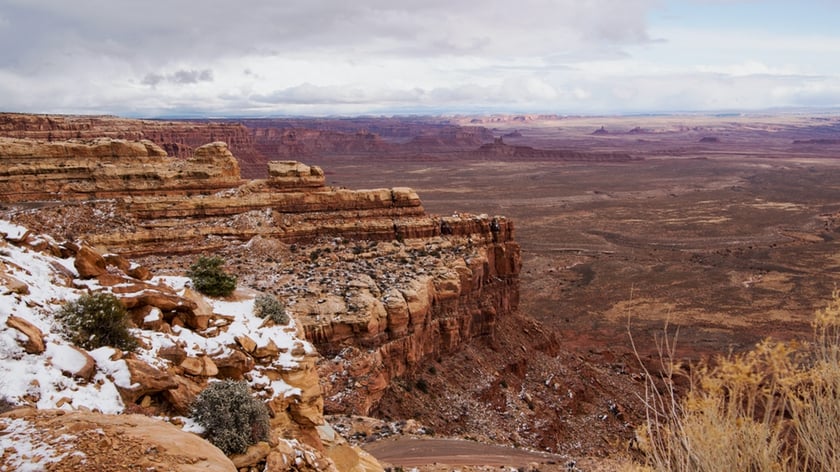
If you have time and you're up for it, in addition to visiting the Valley of the Gods, you can drive along… Moki Dugway, a marvelous panoramic road that is known to be daunting, perhaps even dangerous. Watch this video to get an idea. When you come to the end of Valley of the Gods Road, turn right. After about a mile or so, you will start driving up the Cedar Mesa on a very steep, narrow dirt road without guardrails (if you come from the north, you will have to go downhill on the Moki Dugway, which may be an even more thrilling experience).

Consequently, it will be very challenging to travel on this road in cars without four-wheel drive, especially if the road conditions are compromised by rain or snow. However, if you are driving a 4×4 or a tall car, you can drive it to the top and reach also Muley Point Overlook, a viewpoint not too far away, from which you can enjoy exceptional views of the San Juan River, Glen Canyon National Recreation Area, Monument Valley and see as far as Arizona and Colorado.

Where to Stay near Valley of the Gods

valley of the gods hiking

If you plan to stay in the area, you can find accommodations in one of the locations we have already mentioned in our article about where to stay in Monument Valley. If you are headed north to visit the parks of Utah (Canyonlands, Arches, Capitol Reef…), you can look for accommodations in Monticello or Moab, depending on how close you want to get.

Accommodations in Moab

Accommodations in Monticello

Video Tour

Looking for accommodations for your trip from California to other parts of the Southwest? Read our guide that contains reviews of hotels and strategic tips for finding accommodations near major attractions: Where to Stay: Our Tips for the SouthWest Area


Jason @BeardedOverland www.beardedadv.blogspot.com

Life update.